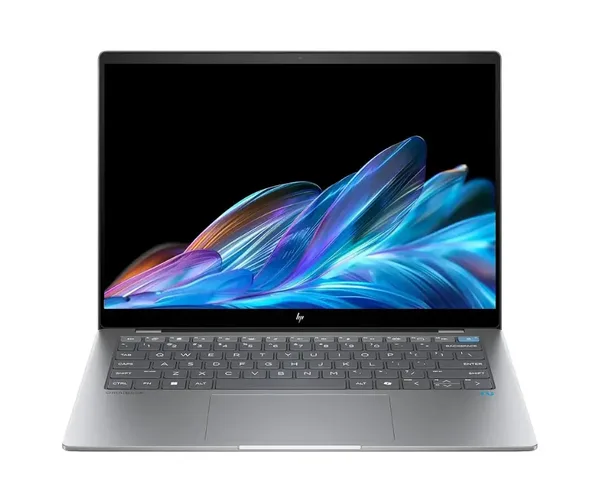
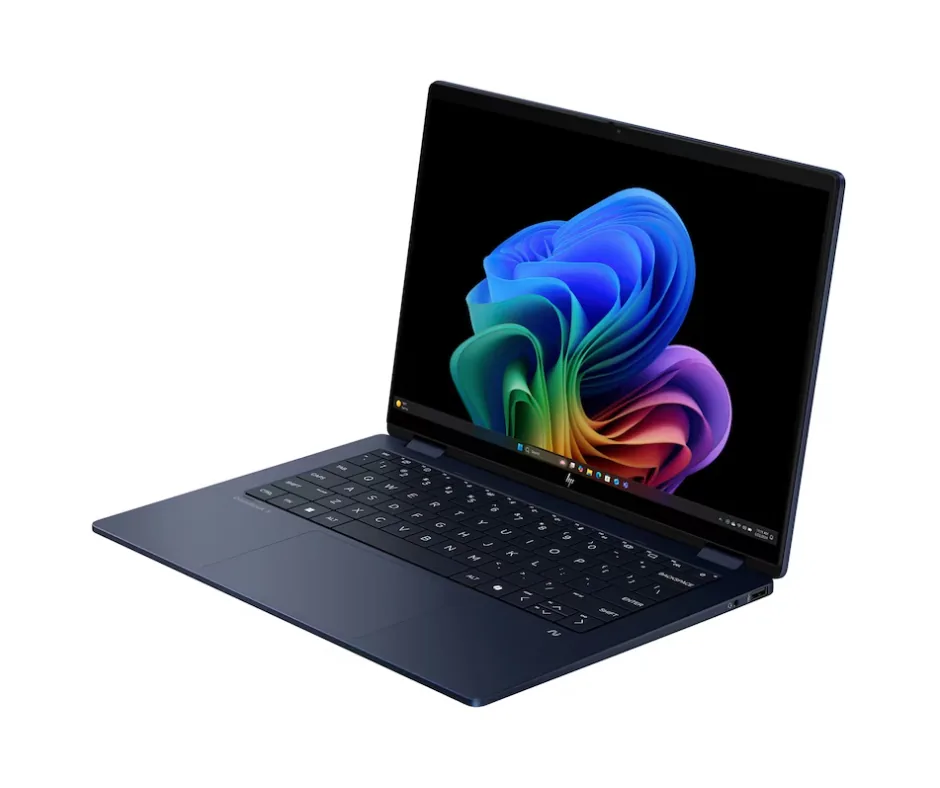
The laptop market continues to evolve, and HP is bringing a new direction to its premium laptop lineup with the HP OmniBook series. Previously known for stylish, powerful laptops under the HP Envy brand, HP is now placing greater emphasis on AI-powered computing, productivity, and modern user experiences.The HP OmniBook X builds on the qualities that made HP Envy laptops popular: premium design, portability, dependable performance, and impressive displays. It introduces newer technologies designed to support modern business users, students, freelancers, and creative professionals.But what exactly has changed? How does the HP OmniBook X compare with the HP Envy series, and is it worth considering as your next laptop?In this guide, we'll explore the key differences, highlight the major features, and help you choose the right HP laptop for your needs.
1. From HP Envy to HP OmniBook X: Understanding the Transition
For years, the HP Envy series has appealed to users who want more than a basic laptop. Its combination of elegant design, premium materials, strong performance, and versatile features made it a popular choice for professionals, students, and content creators.The HP OmniBook family represents HP's newer approach to consumer and premium laptops, with a stronger focus on AI capabilities, battery efficiency, and intelligent productivity features.Rather than focusing exclusively on traditional computing performance, newer OmniBook models incorporate dedicated neural processing units (NPUs) to accelerate supported AI workloads.This means the laptop can be designed to handle tasks such as video conferencing enhancements, AI-assisted productivity, and selected creative applications more efficiently.The key takeaway: The move from HP Envy to HP OmniBook is about evolving the premium laptop experience to meet the needs of modern computing.Note: HP has introduced multiple OmniBook families and configurations. The exact replacement for an Envy model depends on its size, processor, features, and intended use.
2. What Has Carried Forward from HP Envy?
Although the product family has evolved, many of the qualities associated with HP Envy remain important in the OmniBook lineup.
Premium Design and Build Quality
HP Envy laptops earned recognition for their sleek appearance, slim profiles, and premium construction.OmniBook models continue this design philosophy, with selected configurations featuring aluminum construction, clean lines, and lightweight designs suitable for commuting, travelling, and everyday professional use.For customers who value a laptop that looks as good as it performs, the OmniBook range offers several premium options.
Flexible 2-in-1 Designs
The HP Envy x360 helped popularize the convertible laptop experience, allowing users to switch between traditional laptop and tablet-style use.Selected HP OmniBook Flip models continue this approach with a 360-degree hinge and touchscreen functionality.Depending on the model, these laptops can be used for:
Traditional typing and office work.
Digital note-taking during classes and meetings.
Presentations and collaborative work.
Drawing, sketching, and creative projects.
Watching videos and browsing in tablet mode.
Stylus compatibility and included accessories vary by configuration, so check the specifications before purchasing.
Designed for Students and Professionals
The OmniBook lineup continues to serve users who need a balance of portability, performance, and convenience.Students can use these laptops for research, assignments, online learning, and multitasking. Business professionals can benefit from their portability and collaboration features, while freelancers and creators can choose configurations suited to their workloads.
Quality Displays and Audio
Display quality remains an important consideration when choosing a premium laptop.Depending on the model, the OmniBook range offers high-resolution screens, touchscreen options, and OLED displays. Selected configurations also feature enhanced audio and video-conferencing technologies.These features can improve the experience of editing images, watching films, attending virtual meetings, and working with documents for extended periods.
3. What's New in HP OmniBook X?
The biggest changes involve AI processing, power efficiency, collaboration features, and selected display configurations.
Dedicated AI Processing
One of the most important additions to newer AI-focused laptops is the neural processing unit, or NPU.An NPU is designed to accelerate certain AI tasks without relying entirely on the CPU or GPU.Depending on the processor, HP OmniBook configurations may offer substantial on-device AI processing capabilities.Potential benefits include:
Improved efficiency for supported AI applications.
Background-noise reduction during video calls.
Camera enhancements and selected conferencing effects.
Faster processing for compatible AI-assisted tasks.
Better power efficiency for certain AI workloads.
NPU performance is measured in trillions of operations per second (TOPS). However, TOPS ratings are not directly equivalent to overall laptop performance, and actual results depend on the application, processor, and workload.
Longer Battery Life
Battery life is another important consideration for people who work away from a desk.Some HP OmniBook configurations advertise extended battery life, with certain models targeting up to 28 hours under specified test conditions.Actual battery performance depends on screen brightness, applications, wireless connectivity, processor configuration, and usage patterns.For students attending classes throughout the day or professionals who travel frequently, choosing a laptop with strong battery efficiency can reduce the need to carry a charger everywhere.
AI-Powered Productivity Features
Selected OmniBook models support AI-powered Windows features and HP software designed to simplify everyday work.Depending on the device and software version, available capabilities may include:
AI-assisted productivity tools.
Camera and microphone enhancements.
Improved video-call experiences.
Assistance with supported writing and research tasks.
On-device processing for compatible applications.
Some features require an internet connection, a compatible processor, software updates, or a subscription. Availability varies by model and region.
Improved Video Conferencing
Online meetings have become an essential part of business and education.Selected HP OmniBook laptops include collaboration technologies designed to improve camera performance, audio clarity, and background-noise management.Features may include HP Poly Camera Pro and other video-conferencing enhancements, depending on the model.For professionals who regularly attend virtual meetings, these tools can help create a clearer and more professional communication experience.
High-Resolution OLED Displays
Selected HP OmniBook Flip models offer high-resolution OLED displays with rich contrast, deep blacks, and vibrant colours.Some configurations feature variable refresh rates, allowing the screen to adjust its refresh rate according to the content and display settings.These displays can be particularly useful for:
Photo editing and graphic design.
Video editing and content creation.
Presentations and visual projects.
Streaming films and other entertainment.
Everyday productivity and multitasking.
Not every OmniBook model includes an OLED screen, so compare the display specifications of individual configurations before making a purchase.
4. HP OmniBook X Models: Which Configuration Should You Choose?
The right OmniBook depends on whether you prioritize portability, battery life, graphics performance, or the flexibility of a convertible design.The following table summarizes the configurations described in this guide. Confirm the exact model numbers and regional specifications before publishing product listings.
Processor family | Intel Core Ultra | AMD Ryzen AI 300 Series | Snapdragon X Elite
Form factor | Convertible 2-in-1 | Convertible 2-in-1 | Traditional clamshell
Display | Selected 3K OLED configurations | Selected 3K OLED configurations | Selected 2.2K touchscreen configurations
AI processing | Depends on processor configuration | Depends on processor configuration | Depends on processor configuration
Battery life | Configuration dependent | Configuration dependent | Configuration dependent
Best suited for | Productivity and flexible working | Multitasking and supported creative workloads | Portability and efficient everyday computing
Important: Processor names, display resolutions, NPU ratings, connectivity options, and advertised battery life can differ between product generations. Use the official specifications for the exact SKU when comparing or selling these laptops.
HP OmniBook X Flip: For Flexible Working
The OmniBook Flip is worth considering if you want a laptop that adapts to different situations.Its convertible design can be useful for students who take handwritten notes, professionals who present information to colleagues, and creators who prefer touchscreen interaction.Choose a configuration with sufficient memory and processing power for the applications you use most often.
HP OmniBook X with AMD: For Multitasking and Creative Work
AMD-powered configurations can be attractive to users who need strong multitasking performance and integrated graphics capabilities.Depending on the processor and cooling design, these laptops may suit office productivity, programming, content creation, and other demanding everyday workloads.If graphics performance matters, compare independent benchmarks for the specific processor rather than relying on the processor brand alone.
HP OmniBook X with Snapdragon: For Portability and Efficiency
Snapdragon-powered OmniBook models are designed around Arm-based computing, with an emphasis on power efficiency and AI capabilities.They can be suitable for professionals, students, and frequent travellers who value portability and long battery life.Before purchasing, check that your essential applications, specialist software, peripherals, and device drivers are compatible with Windows on Arm.
5. Key Specifications to Consider Before Buying
When comparing HP OmniBook models with older HP Envy laptops, look beyond the product name.The following specifications can have a significant impact on your everyday experience.
Memory (RAM)
Memory affects how well your laptop handles multiple applications simultaneously.For office work, online learning, and everyday multitasking, 16GB of RAM is a useful starting point for many users.For heavier workloads involving virtual machines, large creative projects, or extensive multitasking, 32GB may be preferable.Memory capacity and upgrade options vary by model. Many thin-and-light laptops use onboard memory that cannot be upgraded after purchase.
Storage
An SSD improves boot times, application loading, and general system responsiveness.A 512GB SSD can be sufficient for office documents, web applications, and everyday files. Users who store large videos, photos, software projects, or extensive media libraries may prefer 1TB or 2TB of storage.Check the exact configuration and whether the SSD can be replaced or upgraded.
Display Quality
A laptop's display affects everything from reading documents to editing photographs.When comparing screens, consider:
Resolution and screen size.
OLED versus LCD technology.
Brightness and colour coverage.
Touchscreen support.
Refresh rate.
Glare and reflections.
Whether the display suits your intended workload.
A high-resolution OLED panel can be an excellent choice for visual work and entertainment, but a good LCD display may offer better value for users who primarily work with documents and spreadsheets.
Portability and Connectivity
Weight, dimensions, battery capacity, and charging options matter if you regularly carry your laptop.Also check the ports you need, including USB-C, USB-A, HDMI, and headphone connectivity, as available.If you rely on mobile internet, confirm whether the exact model supports cellular connectivity. Do not assume that 5G is available across the entire OmniBook family.
6. A Quick Upgrade Guide for HP Envy Users
If you're currently using an HP Envy, your ideal replacement depends on how you use your laptop.Coming from an HP Envy x360?Consider an HP OmniBook Flip if you want to retain the convertible touchscreen experience. Check whether the screen size, stylus support, and port selection match your existing workflow.Coming from a traditional HP Envy laptop?Consider a standard HP OmniBook configuration if you prefer a conventional laptop design without a 360-degree hinge.Need a laptop for business and office productivity?Look for a configuration with sufficient RAM, a fast SSD, a comfortable keyboard, good video-conferencing features, and reliable battery performance.Need a laptop for design or content creation?Prioritize the display, processor, memory, graphics capabilities, and compatibility with your preferred creative applications.Travel frequently or work away from the office?Compare real-world battery tests, laptop weight, charging options, and connectivity. A model with an efficient processor may be particularly attractive if portability is your priority.
7. What Makes the OmniBook Experience Different?
The transition from Envy to OmniBook reflects changes in what users expect from a premium laptop.
A Modern Premium Design
The emphasis remains on combining portability with a professional appearance.Depending on the model, you'll find slim designs, premium finishes, and construction intended for everyday use at home, in the office, or on the move.
AI-Assisted Productivity
AI features are becoming more common across personal computers.On compatible OmniBook models, supported tools can assist with selected productivity tasks, improve video calls, and accelerate certain AI workloads.However, AI capabilities differ between processors, and not every feature runs locally. Review the privacy policy and processing requirements of individual applications before using them with sensitive business information.
A Better Experience for Modern Work
Today's professionals often switch between documents, video meetings, browser tabs, communication tools, and creative applications.A well-configured OmniBook can provide the performance and portability needed for these workflows.The most suitable configuration will depend on your workload, budget, software requirements, and preferred screen size.
8. Is HP OmniBook X Worth the Upgrade?
The HP OmniBook X is worth considering if you want a modern laptop with a premium design and features suited to current computing needs.It may be a particularly attractive option if your existing laptop has limited memory, poor battery performance, an ageing processor, or a display that no longer meets your needs.However, upgrading is not essential simply because a new product family has been introduced.If your HP Envy still performs well for your everyday tasks, you may not need to replace it immediately. Compare the specifications, performance, battery life, and price of the available models before deciding.For buyers choosing a new laptop, the OmniBook range provides several options for different needs, from flexible 2-in-1 designs to traditional laptops focused on portability and efficiency.
Final Thoughts: The Next Chapter in HP Premium Laptops
The HP Envy series established a strong reputation for combining style, portability, and everyday performance.The newer HP OmniBook lineup builds on many of those priorities while introducing a greater emphasis on AI-enabled computing, modern processors, power efficiency, and productivity features.For students, professionals, freelancers, and business users, the key is to choose a configuration that matches the way you work.Before purchasing, compare processor performance, RAM, storage, display quality, battery life, connectivity, and software compatibility.Looking for your next HP laptop? Explore the available HP OmniBook models and compare their specifications to find the right balance of performance, portability, and value for your needs.